Build a Whole Learning Path From One Sentence
Describe what your reps need in one sentence and the smart content builder drafts the whole learning path: a study guide, a test, practice scenarios and a final scored practice. You review every draft before anything is saved.
Getting reps ready for a new kind of call meant a lot of building. Someone wrote the practice scenarios, then a rubric to score them, then the terms reps had to know, then a test on those terms. After all that, they still had to put everything in order so a new rep knew what to do first.
The smart content builder now does that assembly for you. Describe what your reps need in one sentence, and Salesably drafts the whole learning path: the study guide, a test, the practice assignments and a final scored practice. You read every draft before anything is saved.
Here is the whole flow in one minute, from the request to what a rep sees:
What one request builds
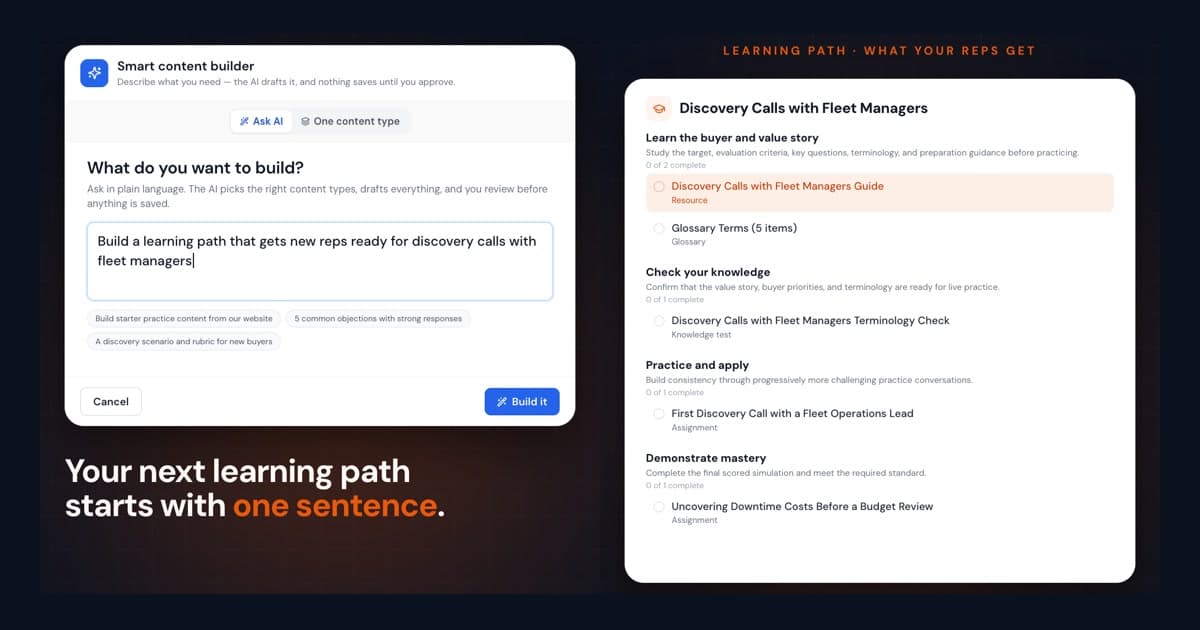
In the video, an admin types: "Build a learning path that gets new reps ready for discovery calls with fleet managers." From that one line, the builder drafts:
- Practice scenarios. Here they are two discovery scenarios, each with an AI buyer to talk to and the questions the rep should get answered. The builder picks the scenario type that fits your request, so an ask about pricing pushback leans toward objection scenarios.
- A rubric. This is how every practice session gets scored, and the study guide is written from it.
- Glossary entries. These are the terms your reps need to use correctly, each with why and when they come up.
- The learning path. It holds everything above, in order.
The path comes in four sections:
- Learn the buyer and value story. A study guide written from the rubric, plus the glossary.
- Check your knowledge. A short test on the glossary terms, one question per term.
- Practice and apply. Practice sessions with an AI buyer, assigned as practice scenarios.
- Demonstrate mastery. A final scored practice with a passing score, 80% by default.
How it works
- Open the builder. In the side nav's Admin panel, click Build content at the top, then choose Ask AI.
- Say what you want. Write the request the way you would explain it to a colleague. To ground the drafts in your own material, add context: a website URL, an uploaded document, a file already in your studio, or your Studio Context.
- Let it build. The builder reads your studio's positioning and checks what content you already have, then drafts each piece. You watch every step tick off as it finishes.
- Review your drafts. Open any draft to edit it, and untick anything you don't want. To change something across the drafts, type it into Refine or add drafts, for example "Make the persona a procurement director". Nothing is saved until you click Add to my studio, which shows how many drafts you kept.
- Publish and assign. The learning path is saved as a draft, so your team doesn't see it yet. Click Open learning path, check the sections, publish it and assign it. The study guide starts as an outline of your rubric, and the full guide replaces it within a minute or two.
What your reps see
A rep opens the path and works through it in order. They read the study guide, review the glossary and take the test. Then they practice the conversation with an AI buyer, up to the final scored practice. That last assignment tells them the bar up front: a passing score of 80%.
Every piece is ordinary studio content. Once saved, the scenarios, rubric and glossary are yours to edit, reuse in other paths or assign on their own.
Requests to try
The request can be as narrow or as broad as the training you need. A few to start with:
- "Build a learning path that gets new reps ready for discovery calls with fleet managers"
- "Build starter practice content from our website"
- "5 common objections with strong responses"
- "A discovery scenario and rubric for new buyers"
If the first draft isn't right, you don't start over. Tell the builder what to change and it rewrites the drafts.
Try it
Studio admins have the smart content builder now. Open Build content and describe the call your reps keep getting wrong.
New to Salesably? Book a demo to see it on your own calls.
Author

Vidal Graupera
Vidal is the Founder of Salesably, focused on using AI to elevate human skills in sales training and enablement. He has extensive experience in building platforms that leverage artificial intelligence for sales improvements.
Table of Contents
Free Sales Training Guide
Download our comprehensive guide to building effective sales training programs that drive results.
AI Sales Training Template: 2026 Edition
PDF Guide • 16 pages • 3.0 MB
We respect your privacy. Unsubscribe at any time.